
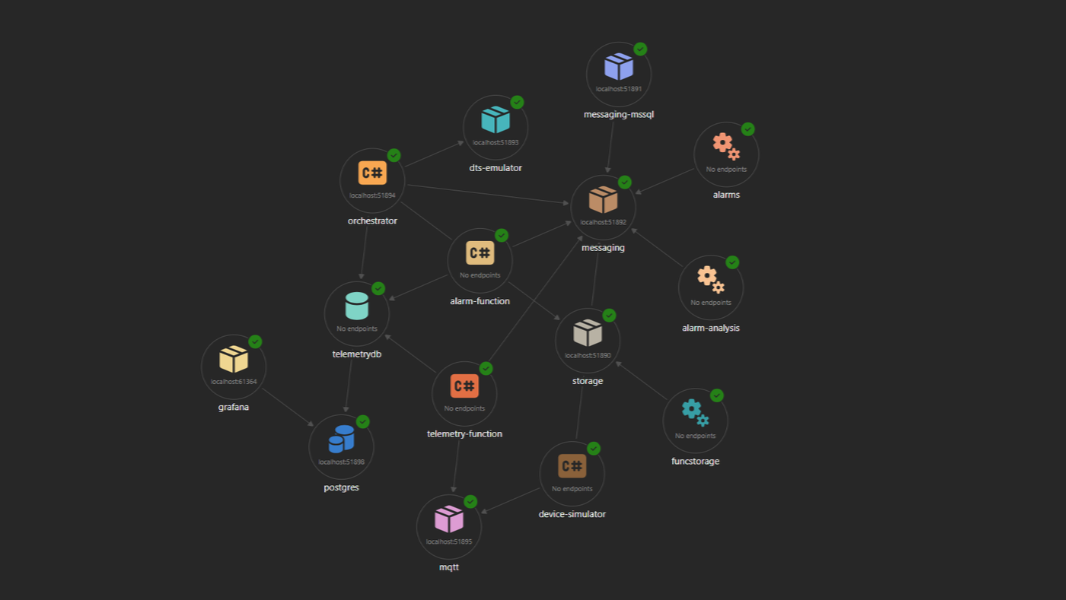
Azure Durable Task Scheduler (DTS) is Microsoft’s managed orchestration backend for Durable Functions — a fully integrated alternative to the classic Azure Storage-based state store. It brings better performance, a built-in dashboard, and a cleaner operational model.
For local development, Microsoft ships aDTS emulator as a Docker container. In this article, I want to show you how I integrated it into a .NET Aspire app host, using Aspire’s own configuration management to automatically wire up the connection string — no manual config files, no hardcoded ports.
The Setup
The emulator is not yet available as a first-class Aspire integration (no AddDurableTaskScheduler() extension — at least not yet). However, Aspire gives you a perfectly capable escape hatch: AddContainer(). Combined with WithEnvironment() endpoint references, this is all you need.
AppHost — Registering the Emulator
In AppHost.cs, the DTS emulator is registered as a plain container resource:
var dtsEmulator = builder.AddContainer("dts-emulator", "mcr.microsoft.com/dts/dts-emulator", "latest")
    .WithEndpoint(targetPort: 8080, name: "grpc")
    .WithEndpoint(targetPort: 8082, name: "dashboard", scheme: "http")
    .ExcludeFromManifest();

var dtsGrpcEndpoint = dtsEmulator.GetEndpoint("grpc");
Two endpoints matter here:
- Port 8080 — the gRPC endpoint that Durable Functions connects to at runtime
- Port 8082 — the emulator’s built-in dashboard, useful for inspecting orchestration state during local development
ExcludeFromManifest() keeps it out of the Azure deployment manifest, since the emulator is a local-only concern.
Injecting the Connection String
The interesting part is how the connection string reaches the Orchestrator project. Rather than hardcoding localhost:8080, Aspire builds the connection string dynamically from the endpoint reference:
builder.AddAzureFunctionsProject<Projects.IoT_AI_Demo_Orchestrator>("orchestrator")
    .WithHostStorage(storage)
    .WithReference(serviceBus)
    .WithReference(telemetrydb)
    .WithEnvironment(ctx =>
    {
        ctx.EnvironmentVariables["DURABLE_TASK_SCHEDULER_CONNECTION_STRING"] =
            ReferenceExpression.Create(
                $"Endpoint=http://{dtsGrpcEndpoint.Property(EndpointProperty.Host)}:{dtsGrpcEndpoint.Property(EndpointProperty.Port)};Authentication=None");
    })
    .WithEnvironment("TASKHUB_NAME", "default")
    .WaitFor(dtsEmulator);
ReferenceExpression.Create() is the key here. It lets you compose a string from Aspire endpoint properties — host and port — which are resolved at runtime after Aspire assigns the actual dynamic ports. The resulting connection string looks like:
Endpoint=http://localhost:8080;TaskHub=default;Authentication=None
The Orchestrator project picks this up from its environment, just like any other configuration value. No app settings file needs to be touched. No launchSettings.json gymnastics.
NuGet Packages
On the AppHost side, the container-based approach means you don’t need any DTS-specific hosting package — just the standard Aspire Azure Functions hosting:
<PackageReference Include="Aspire.Hosting.Azure.Functions" Version="13.1.2" />
On the Orchestrator side, the Azure-managed Durable Task extension is what connects to DTS:
<PackageReference Include="Microsoft.Azure.Functions.Worker.Extensions.DurableTask.AzureManaged" Version="1.5.0" />
<PackageReference Include="Microsoft.Azure.Functions.Worker.Extensions.DurableTask" Version="1.16.0" />
Why This Works Well
The reason I like this pattern is that the Orchestrator project doesn’t need to know anything about how or where the emulator is running. It just reads DURABLE_TASK_SCHEDULER_CONNECTION_STRING from configuration — the same variable it would read in production when pointing at the real Azure DTS endpoint. Aspire handles the rest.
This makes the local and cloud configurations symmetric. When you deploy to Azure, you swap the emulator for the real DTS resource and update the connection string. The Orchestrator code and its startup don’t change at all.
The WaitFor(dtsEmulator) call ensures the container is healthy before the Orchestrator starts — something that’s easy to forget and painful to debug without it.
Full Source
The complete implementation is part of a larger IoT platform demo — a simulated smart fish tank with AI-powered alarm analysis using Azure Durable Functions, Azure OpenAI, and RAG via pgvector. This was the centerpiece of my talk at the meetup organized by the Macedonian .NET Community on March 11, 2026.
If you attended, this article is the written companion to what I showed live. If you didn’t, the full source is available at github.com/janeski/iot_with_ai_durable_functions — everything you need to run the demo locally is there.