
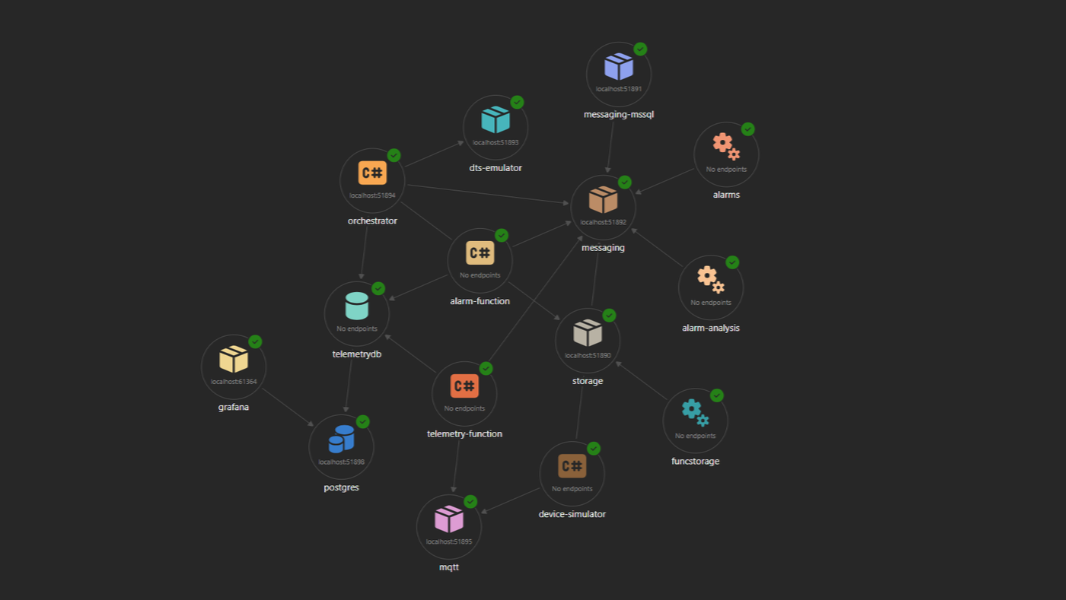
Azure Dev Tunnels let you expose a local port to the internet over a secure tunnel. For Aspire apps, the most useful scenario is one that every developer has encountered: you want a stakeholder or QA tester to access what you’re building before it’s deployed anywhere.
You have a feature branch running locally. The product owner wants to click through it. A QA engineer wants to test it on their phone or tablet. The traditional answer is “give me time to spin up a dev environment.” With the first-class Dev Tunnels integration in Aspire, the answer is “here’s a link.”
The Setup
Aspire ships a dedicated hosting package for Dev Tunnels. Add it to the AppHost:
<PackageReference Include="Aspire.Hosting.DevTunnels" Version="13.1.2" />
That’s the only dependency. No separate CLI tooling to wire up, no AddExecutable workarounds.
AppHost — Registering the Tunnel
In AppHost.cs, a dev tunnel is added with AddDevTunnel() and pointed at any resource using WithReference(). In the IoT demo, the tunnel exposes the Grafana dashboard:
var grafana = builder.AddContainer("grafana", "grafana/grafana", "latest")
    .WithEndpoint(targetPort: 3000, port: 61364, name: "http", scheme: "http")
    .WithEnvironment("GF_SERVER_ROOT_URL", "http://localhost:61364/")
    .WithEnvironment("GF_AUTH_ANONYMOUS_ENABLED", "true")
    .WithEnvironment("GF_AUTH_ANONYMOUS_ORG_ROLE", "Admin")
    .WithEnvironment("GF_AUTH_DISABLE_LOGIN_FORM", "true")
    // ... additional environment and bind mounts
    .WithUrl("http://localhost:61364/d/fishtank-iot/fish-tank-iot-dashboard", "Fish Tank Dashboard")
    .WaitFor(postgresServer)
    .ExcludeFromManifest();

var enableGrafanaTunnel = string.Equals(
    Environment.GetEnvironmentVariable("ENABLE_GRAFANA_TUNNEL"),
    "true",
    StringComparison.OrdinalIgnoreCase);

if (enableGrafanaTunnel)
{
    builder.AddDevTunnel("grafana-tunnel")
        .WithReference(grafana)
        .ExcludeFromManifest();
}
WithReference(grafana) is all it takes to tell Aspire which resource to forward through the tunnel. Aspire resolves the endpoint and creates the tunnel automatically at startup — no port numbers to manage, no CLI commands to run separately.
Opt-In via Environment Variable
The tunnel is gated behind an environment variable, ENABLE_GRAFANA_TUNNEL=true. This is an intentional design choice.
Running a dev tunnel when you’re just iterating locally adds unnecessary overhead and exposes the service to the internet when you don’t need it. The opt-in pattern means the tunnel is off by default, and you enable it explicitly when you’re ready to share:
ENABLE_GRAFANA_TUNNEL=true dotnet run --project src/IoT_AI_Demo.AppHost
Or set it in your machine’s environment variables for the session. Either way, your colleagues who just want to run the app locally are not affected.
ExcludeFromManifest
Both the Grafana container and the dev tunnel resource are marked with ExcludeFromManifest(). This keeps them out of the Azure deployment manifest generated by azd. In production, Grafana is replaced by Azure Managed Grafana or a dedicated monitoring solution — the local container and its tunnel are purely a local development convenience.
Why This Works Well
The stakeholder or QA tester gets a real HTTPS URL with a valid certificate. No self-signed warnings, no VPN, no account required on their end. They open it on a phone, a tablet, or a laptop on a different network — it just works.
The tunnel is part of your Aspire session. It appears in the Aspire Dashboard alongside your other resources. It starts when you start the app and stops when you stop it. There is no separate process to remember to run, no port mapping to keep in sync, and no leftover tunnel processes when the session ends.
For sharing a live dashboard with a stakeholder during a demo or review session, this is the lowest-friction path from running locally to having external eyes on the feature.
Full Source
The complete implementation is part of the IoT platform demo — a simulated smart fish tank with AI-powered alarm analysis using Azure Durable Functions, Azure OpenAI, and RAG via pgvector. This was the centerpiece of my talk at the meetup organized by the Macedonian .NET Community on March 11, 2026.
The full source, including the AppHost wiring described above, is at github.com/janeski/iot_with_ai_durable_functions.