
Harness, Sandbox, State, Speed: Azure Container Apps in the Agentic Era
For many years, Azure Container Apps (ACA) has been my first choice for implementing microservices and distributed applications. ACA encapsulates everything you need from Kubernetes, so you can focus on your business goals instead of the complexity of running a Kubernetes cluster. You get containers, revisions, scale to zero and KEDA-based autoscaling — without running a cluster. As a matter of fact, my rule of thumb is: if you don’t have Kubernetes skills and you don’t need a specific Kubernetes feature, then ACA is probably what you need.
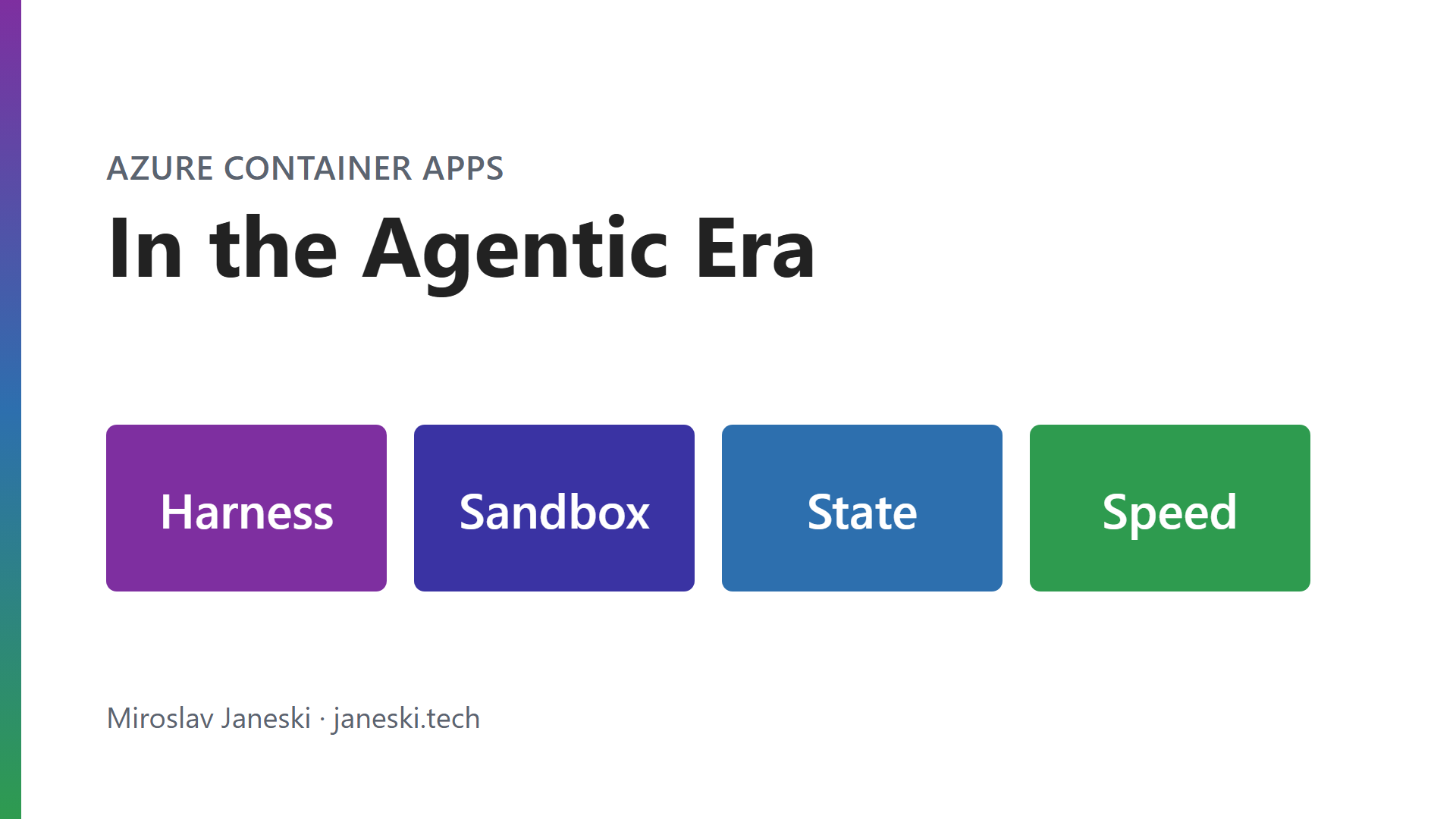
But in the era of AI, an agent needs four things that a classic web app never asked for:
- A harness — a place for the agent loop itself to run, that wakes up for a conversation and costs nothing in between.
- A sandbox — a place where the agent can run freely, executing code it just wrote, without putting anything else at risk.
- State — so that I can pick up a session later, exactly where the agent left it.
- Speed — none of the above works unless start, pause and resume are practically instant. Nobody waits 30 seconds for a container while chatting with an agent.
The answer is a new ecosystem inside Container Apps: Express for the harness, Dynamic Sessions for the sandbox, and Sandboxes for state — all three built for speed.
In this article, I want to walk you through the three services — what they are, what they are good at, and where their limits are.
1. The ecosystem at a glance
Before diving in, it helps to see the four compute types side by side. Microsoft’s own documentation now positions them like this:
| Compute type | Best for | Lifecycle | State |
|---|---|---|---|
| Apps (incl. Express) | Long-running services, APIs, web apps | Continuous | Stateless |
| Jobs | Run-to-completion tasks, batch | Start → run → complete | Stateless |
| Dynamic sessions | Managed code execution, LLM-generated scripts | Managed by the session pool | Ephemeral |
| Sandboxes | Programmable isolated compute | You manage: create, suspend, resume, delete | Stateful (snapshots, volumes) |
The way I think about it from an agent’s perspective:
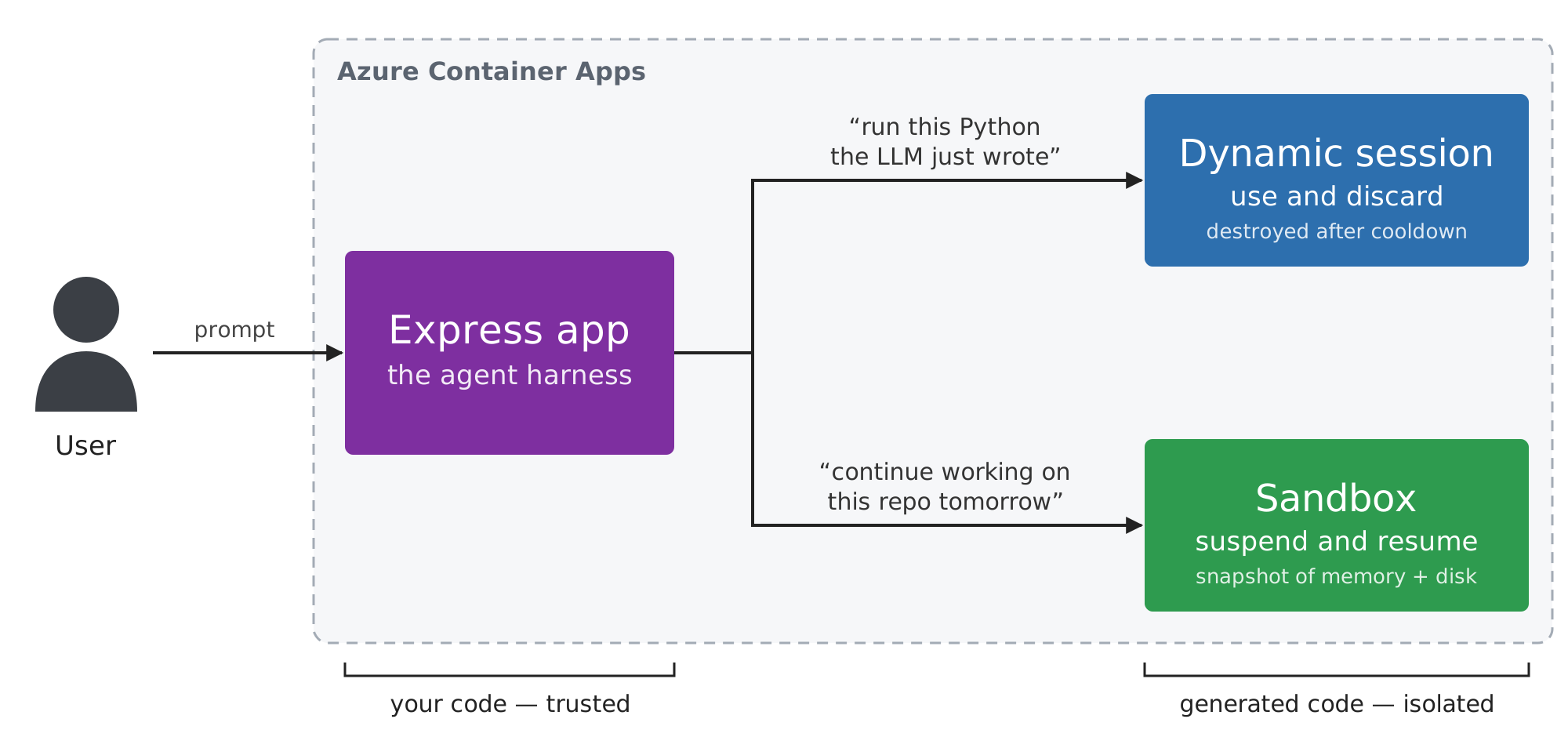
Express runs the code you trust. Sessions and Sandboxes run the code you don’t.
2. Express — the agent harness
By harness I mean the code around the model: the loop that takes the user’s prompt, calls the LLM, picks a tool and decides what happens next. It’s code you wrote and trust, and it needs a place to run.
What is Express?
Container Apps Express is the “just run my container” mode of Container Apps. Microsoft describes it as a developer-first and agent-first platform: opinionated defaults, a minimal configuration surface, and no waiting for environment provisioning before you can create an app.
You bring an image. You get an HTTPS endpoint.
What makes Express different
Standard Container Apps runs on Kubernetes. Microsoft hides the cluster, but pods, sidecars, KEDA and Dapr are all there underneath. Express is different. According to the Express FAQ, under the hood, Express is built entirely on Container Apps Sandboxes: each workload runs in its own isolated microVM, started from prewarmed pools. That is where the subsecond scale-from-zero comes from.
There is a second trick: Express can restore an app’s disk and memory state instead of replaying its boot sequence on every start. A Microsoft engineer raced Express against a standard Consumption environment with the same container image in West Central US:
| Measured | Express | Consumption |
|---|---|---|
| Cold start from zero (request to first response) | ~1.5 s | ~20 s |
| Environment provisioning | ~14 s | ~120 s |
| First deploy (environment + app) | ~52 s | ~166 s |
| App deploy only (environment exists) | ~30 s | ~30 s |
Once the environment exists, both deploy an app in the same ~30 seconds. The difference is in everything that used to be built from scratch: the environment and the cold start.
It also explains the feature list. Sidecars, init containers, Dapr, custom KEDA scalers, service discovery and jobs all come from the Kubernetes pod model. Microsoft doesn’t spell out the reason, but my reading is simple: Express trades the pod model for speed, and the features built on pods don’t come along.
Key features
Scale from zero, with optimized cold start. Express apps run on consumption CPU, scale to zero when idle and come back on demand. The platform optimizes cold-start behavior for you.
Why it matters: Agent traffic is bursty. Nothing for hours, then a flurry of chat turns. Paying for idle replicas makes no sense for that pattern.
→ You pay for the conversations, not for the waiting.
Opinionated defaults. Scaling rules, networking and resource allocation are decided by the platform. You can still scale on HTTP, CPU or memory, use user-assigned managed identities, IP restrictions, CORS, VNet egress and private endpoints.
Why it matters: Most agent backends are just HTTP APIs that call a model. They don’t need a networking design session.
→ Fewer decisions, faster time to production.
A separate management experience. Express apps are managed through a dedicated UI at containerapps.azure.com, not the standard Azure portal. In the portal, the platform creates a lightweight environment for you; from the CLI, you still create the environment yourself.
Limitations
Express is intentionally narrow, and it is important to be honest about what you give up:
- No GPU — Express hosts the agent, not the model. For inference, you need serverless GPUs with workload profiles.
- HTTP only — no HTTP/2, no TCP, no additional ports. Fine for REST and streaming responses, not for gRPC.
- No OpenTelemetry, no Dapr, no sidecars, no Aspire — this one hurts me personally. Tracing an agent’s reasoning steps across services is exactly where OpenTelemetry shines.
- No custom domains, no Easy Auth, no Key Vault secret references — you live on
*.azurecontainerapps.iowith secrets stored on the app. - Single revision only — rolling updates work, traffic splitting doesn’t.
Impact: Express is perfect for agent APIs, chat frontends, AI gateways and prototypes. For an enterprise production system that needs custom domains, full observability and fine-grained networking, a standard workload profiles environment is still the right home.
3. Dynamic Sessions — the sandbox
What are Dynamic Sessions?
Dynamic sessions give you fast access to secure, sandboxed environments for running code that must be strongly isolated from everything else. They are the answer to the sandbox requirement: a place where the agent can run freely.
The scenario is familiar to anyone building agents. The LLM generates a Python script to analyse a CSV. You are certainly not going to exec() that inside your API process. The traditional answer was to build your own isolation layer. With dynamic sessions, the answer is one HTTP call.
Key concepts
Session pool. The foundation. A pool keeps a set of prewarmed, ready-but-unallocated sessions. When a request arrives, a session is taken from the pool instead of created from scratch — allocation happens in milliseconds.
Session identifier. You don’t create sessions explicitly. Each request to the pool’s management endpoint carries an identifier query parameter. The pool either routes the request to the existing session with that identifier or allocates a new one. Use a user ID or a conversation ID, and every user gets their own isolated box.
Managed lifecycle. A session stays alive while requests keep coming. After a configurable cooldown period with no activity, it is destroyed and its resources are cleaned up.
Hyper-V isolation. Each session is isolated from other sessions and from the host, with optional network controls.
Two pool types
| Code interpreter pool | Custom container pool | |
|---|---|---|
| Environment | Platform built-in, preconfigured runtimes | Your own container image |
| Setup | No image to build or publish | Image URI required |
| Protocol | The code interpreter REST API | Any language, any TCP protocol you expose |
| Best for | LLM-generated code, user scripts | Proprietary tools, specific OS or library requirements |
My preference is to start with the code interpreter pool. It covers the classic “agent writes and runs Python” case with zero image management. Move to a custom container only when a dependency forces you.
Limitations
- Ephemeral by design — once the cooldown expires, everything is gone. There is no persistent storage.
- The pool decides — you don’t control individual session lifecycles, files or ports beyond what the pool exposes.
- Basic networking — isolation, but not the fine-grained egress policies Sandboxes offer.
Impact: Dynamic sessions are ideal for short, throwaway execution. They don’t answer the state requirement — the agent can’t come back tomorrow and continue.
4. Sandboxes — the state
What are Sandboxes?
Sandboxes are a new first-class resource type in Container Apps (Microsoft.App/SandboxGroups), sitting alongside apps, jobs and dynamic sessions. They provide isolated, ephemeral compute — but with suspend and resume built in.
This is the answer to two requirements together: state, at speed.
Think of a coding agent working on a repository. It clones the code, installs packages, runs the tests, and then the user closes the laptop. With Sandboxes, the agent’s whole machine — processes, memory and disk — is snapshotted. Tomorrow it resumes in under a second, with everything still in place.
Key concepts
Sandbox group. The top-level ARM resource and management boundary. All sandboxes, disk images, snapshots, volumes and secrets are scoped to a group. Organize groups by application, team or environment.
Sandbox. An individual isolated compute instance with its own CPU, memory, disk and network boundary. You interact with it by executing commands, managing files, exposing ports and controlling its lifecycle.
Disk images. OCI container images converted into sandbox root filesystems — use the included public image or bring your own from a public or private registry.
Snapshots. The core feature. A snapshot captures the full state of a running sandbox, including memory. You can use snapshots to:
- suspend and resume a sandbox with all processes intact,
- clone new sandboxes from a known-good state,
- share preconfigured baseline environments across a team.
Volumes. Microsoft-managed persistent storage:
| Volume type | Use |
|---|---|
| Azure Blob | Shared data and artifacts, mountable to many sandboxes at once |
| Data Disk | High-performance storage for databases and build caches, one sandbox at a time |
Lifecycle policies
This is where Sandboxes feel designed for agents rather than adapted to them:
- Auto-suspend — suspend a sandbox after an idle timeout. Idle means no ingress traffic, no code execution, no interactive shell and no file operations.
- Suspend mode — memory mode (full snapshot: disk + memory) or disk mode (disk only).
- Auto-delete — remove sandboxes a given number of days after they stop.
Why it matters: You don’t pay CPU or memory while a sandbox is stopped. An agent workspace can wait for days at the cost of its storage, and still resume instantly.
→ Statefulness no longer means a VM running 24/7.
Speed and scale
Sandboxes start in under a second from prewarmed pools, restore from snapshots in under a second, and burst to thousands of concurrent instances. Sizes range from XS (0.25 cores, 0.5 GiB) up to 3XL (16 cores, 32 GiB, 320 GiB disk), with M (1 core, 2 GiB) as the default.
Architecture
Sandboxes use two planes, which is an intentional design choice:
| Plane | Endpoint | Operations |
|---|---|---|
| ARM control plane | management.azure.com |
Create and manage sandbox groups, VNet connections |
| Data plane | management.azuredevcompute.io |
Sandboxes, images, snapshots, files, volumes, secrets, ports, egress policies |
The reason is simple: creating thousands of short-lived sandboxes through ARM would be far too slow. ARM governs the boundary; the data plane does the fast, high-volume work. You program against it with the Python SDK (azure-containerapps-sandbox) or the REST API.
Egress policies deserve a mention too. You can allow or deny outbound traffic by domain or CIDR and integrate with a VNet — important when an autonomous agent has a shell.
Limitations
- Entra ID only — personal Microsoft accounts aren’t supported.
- An explicit role is required — every user needs Container Apps SandboxGroup Data Owner:
az role assignment create \
  --assignee "<USER_EMAIL_OR_OBJECT_ID>" \
  --role "Container Apps SandboxGroup Data Owner" \
  --scope "/subscriptions/<SUBSCRIPTION_ID>/resourceGroups/<RESOURCE_GROUP_NAME>"
- You own the lifecycle — that’s the point, but it also means more code than with a session pool.
- SDK coverage — Python and REST today.
Impact: More control and more responsibility. Worth it when state matters, overkill when it doesn’t.
5. Sessions or Sandboxes?
Both run untrusted code in isolation, so the question comes up immediately. It depends — on whether the agent needs to remember.
| Dynamic sessions | Sandboxes | |
|---|---|---|
| Access | HTTP through the pool endpoint | Direct SDK/CLI control per sandbox |
| State | Ephemeral, destroyed after cooldown | Suspend, resume, snapshots |
| Control | Pool manages everything | You manage lifecycle, files, ports, policies |
| Storage | None | Azure Blob and Data Disk volumes |
| Networking | Basic isolation | Egress policies, VNet, port management |
If the agent runs a snippet and only needs the result, use dynamic sessions. A code interpreter pool is the least code you will write.
If the agent works on something over time — a repository, a dataset, a long research task, a per-user dev environment — use Sandboxes.
If you’re building a multitenant product where every customer gets their own compute, Sandboxes give you the isolation plus the snapshots to clone a baseline per tenant.
In most agentic systems, I recommend using both: Express hosting the agent, dynamic sessions for quick tool calls, and Sandboxes for the work that has to survive a pause.
Takeaways
- Container Apps is no longer just “simpler Kubernetes” — it is becoming a platform for agents, with compute types designed around how agents behave.
- Express runs the agent harness — fast to provision, scales from zero, but intentionally limited: no GPU, no OpenTelemetry, no custom domains.
- Dynamic sessions are the sandbox — prewarmed, Hyper-V isolated, addressed by a simple identifier, and gone after the cooldown.
- Sandboxes add state — memory-and-disk snapshots, persistent volumes and lifecycle policies let an agent pause and resume its whole workspace.
- Speed is what makes the other three usable — sub-second allocation and restore turn isolation and state from an architecture problem into an API call.
Useful Links
- Azure Container Apps express overview — Microsoft Learn
- Dynamic sessions in Azure Container Apps — Microsoft Learn
- Azure Container Apps Sandboxes overview — Microsoft Learn
- Azure Container Apps express FAQ — Microsoft Learn
- Azure Container Apps Express for Shipping Container Apps Fast — Microsoft Tech Community