

TL;DR
Azure App Service has evolved from a simple web hosting platform into a powerful, cloud-native PaaS — ideal for web apps, APIs, and lightweight container workloads. It shines in simplicity, scalability, security, and integration with the Azure ecosystem. However, it’s still not a full container orchestration platform — limited in runtime control, multi-region automation, and complex microservice topology. Perfect for modern web, API, and SaaS apps, but for deeply cloud-native systems, Azure Container Apps or AKS may be a better fit.
1. Introduction
In this article, I will explore what makes Azure App Service one of the cloud-native alternatives offered by Azure. Azure App Service is one of the first Azure services for web solutions and has evolved significantly since its initial release. It likely has a large customer base and is one of the most used Azure Services, especially in the PaaS world. Before I dive into the feature analysis, I want to give a few comments on what being cloud-native means to me.
2. Being Cloud-Native in 2025
Being cloud-native in 2025 is much more than living in the cloud. As a matter of fact, it might have less to do with the cloud, but much more with how you execute the overall process of modern software development. Microsoft offers great definition and even a book on the topic. In my previous article, I also gave my definition focusing on technology, architecture, and organization. Now, I would like to expand the definition with AI. Quite brave and provocative, but if you don’t use AI for AI-assisted or even AI-generated development, then you are not doing cloud-native in 2025. Why? At its core, the definition says that cloud-native is a software development approach that leverages all available tools and processes to make the process more optimal and efficient. AI-assisted and AI-generated development are precise tools that can accelerate the overall software development process, whether it involves writing code, improving code coverage, executing Bicep scripts, analyzing logs, identifying opportunities for improvement, or contributing bug fixes and enhancements.
3. Azure App Service
Azure App Service is a fully managed platform-as-a-service (PaaS) for building, deploying, and scaling web applications and APIs globally. The name itself indicates that this is a specialized service for web applications and a PaaS, with little or no control over the underlying infrastructure. As I mentioned, Azure App Service is one of the first PaaS services and is likely to have a large customer base for web applications and APIs. Over time, many features have been added to the product to meet market demand. In recent years, many new features were cloud-native or aimed to make the service more competitive and relevant to new customers while remaining compatible with existing customers.
Here is a timeline with the most important features and releases over time grouped into several categories:
- 2012–2015: Foundation
- 2016–2018: Containers & Cross-Platform
- 2019–2020: Security & Networking
- 2021–2023: Resiliency & Observability
- 2024–2025: Modern Extensibility & Performance
Note: The timeline shows the major features relevant to this article; it is not a comprehensive list.
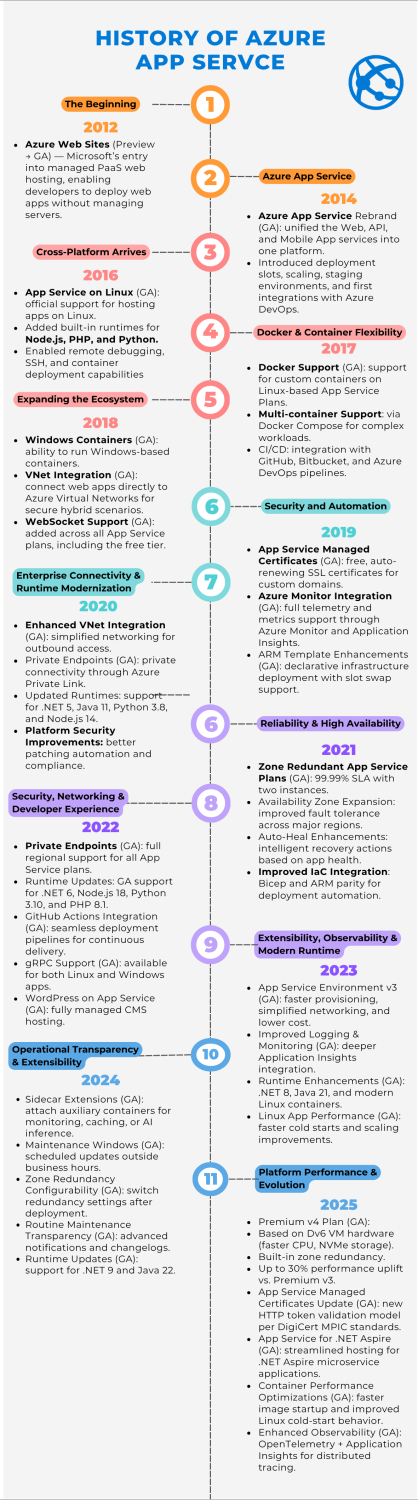
Looking at the timeline, one can conclude that the evolution of Azure App Service mirrors that of modern software development and cloud PaaS offerings. Of course, by following the trends, Microsoft has implemented several important cloud-native features that make Azure App Service a serious candidate for cloud-native solutions.
4. Cloud-Native Features
While the trend of modernization is obvious, I want to emphasize several key cloud-native features.
4.1. App Service on Linux & Containers
Why it matters: This was the turning point from a Windows-only PaaS to a cross-platform, container-based service. It allowed developers to bring Docker images, run custom runtimes, and align App Service with modern DevOps and CI/CD practices.
→ Enabled portability, microservice compatibility, and DevOps automation.
4.2. Deployment Slots & Continuous Delivery
Why it matters: Deployment slots introduced zero-downtime deployments and simplified release management. Combined with continuous integration pipelines, this feature embodies the “you build it, you run it” philosophy.
→ Became the foundation for safe, automated releases — essential for cloud-native operations.
4.3. VNet Integration & Private Networking
Why it matters: This feature brought secure hybrid connectivity and microservice network isolation. App Service apps could finally communicate privately with databases, APIs, and other Azure services inside a virtual network.
→ Bridged enterprise-grade security with cloud-native scalability.
4.4. Managed Certificates & Built-in Auth
Why it matters: Free TLS certificates and easy identity integration reduced the complexity of securing web apps. It removed the need for external certificate management or custom auth flows.
→ Made “secure by default” a reality for small and large teams alike.
4.5. Sidecar Extensions
Why it matters: The introduction of sidecar containers marks App Service’s shift toward microservice patterns without the complexity of Kubernetes. Developers can now co-locate services, improve performance, and decouple concerns. The sidecar pattern is a trademark for microservice architecture based on Kubernetes technology. The main concept behind Dapr technology is based on the sidecar pattern.
→ Transforms App Service into a lightweight, cloud-native platform supporting modern service architectures.
5. Typical Use Cases for Azure App Service
5.1. Modern Web Applications
Host scalable, dynamic web apps with full CI/CD. Tech stack: ASP.NET Core, Node.js, Python, PHP. Examples: SaaS dashboards, customer portals, marketing sites. App Service provides built-in scaling, HTTPS, and continuous deployment.
5.2. API Backends for Web & Mobile
Expose REST or gRPC APIs for your frontends or partners. Tech stack: Express.js, FastAPI, ASP.NET Core. Examples: Mobile backends, B2B integrations, data APIs. App Service offers easy CI/CD, built-in auth, and private networking via VNet Integration.
5.3. Containerized App Modernization
Run custom or legacy workloads in Docker — no Kubernetes needed. Tech stack: Linux/Windows Containers. Examples: Migrated IIS apps, custom runtime services. App Service simplifies lift-and-shift and supports hybrid networking.
5.4. Event-Driven / Serverless-Like Apps
Lightweight automation or background services that scale with demand. Tech stack: Azure Functions, Event Grid, Service Bus, App Service + Timers. Examples: Webhooks, scheduled tasks, notification services. App Service provides always-on, auto-scale, and integration with serverless patterns.
5.5. Secure Enterprise or Line-of-Business Apps
Internal business apps needing identity and compliance. Tech stack: ASP.NET Core, Java, Node.js + Azure AD integration. Examples: HR, finance, supplier, or partner portals. App Service provides built-in auth, managed certificates, and private endpoints.
5.6. AI / Data-Driven Web Apps
Web frontends connected to databases or AI models. Tech stack: Azure OpenAI, Cosmos DB, Azure SQL, Power BI Embedded. Examples: Predictive dashboards, chatbots, analytics UIs. App Service provides secure connectivity with Managed Identity and elastic scaling for AI inference.
6. Limitations
6.1. Limited Container Flexibility
While App Service supports Docker images and sidecars, you still can’t fully control the container runtime environment.
- No Kubernetes-style pod orchestration
- No service mesh (e.g., Istio, Linkerd)
- Limited ability to define inter-container networking or shared volumes
Impact: Harder to run complex microservice systems or stateful workloads natively.
6.2. No Fine-Grained Infrastructure Control
App Service abstracts the infrastructure layer almost completely — great for simplicity, but restrictive for cloud-native tuning.
- You can’t choose custom VM sizes or accelerators (GPUs, DPUs)
- Limited control over OS images and system updates
- No custom sidecar composition beyond what Microsoft enables
Impact: Limits optimization for performance-critical or specialized workloads.
6.3. Lifecycle & Deployment Coupling
App Service deployments often bundle code, configuration, and dependencies together, which can limit independent component versioning.
- No native support for GitOps or container registry triggers (only CI/CD pipelines)
- Slow adaptation to new DevOps paradigms, like progressive delivery or canary by default
Impact: Harder to achieve full declarative, versioned infrastructure-as-code workflows.